
Proposal for Smart Fridge
William Gonzalez, Nadim Hussan, Karim Khalil, Amy Sanchez
City College of New York
ENGL 21007: Writing for Engineering
Sara Jacobson
April 21, 2025
Table of Contents
Proposal for Smart Fridge………………………………. 1
Introduction…………………………………………………… 5
Building Process…………………………………………….. 6
Basic Hardware Components………………………… 8
Compressor ……………………………………………………8
Condenser Coils………………………………………………9
Evaporator coils…………………………………………….. 9
Capillary Tube……………………………………………….. 10
Fan Motors……………………………………………………. 10
Thermistors…………………………………………………… 11
Defrost Heater………………………………………………..11
Drain Pan……………………………………………………….11
Doors and Seals (Gaskets)………………………………12
Shelving units……………………………………………….. 12
Advanced Cooling System………………………………13
Dual Cooling System………………………………………13
Microclimate Zone Controllers……………………….13
Humidity-Controlled Crispers…………………………14
Auto Air Vents………………………………………………..14
Multi-Flow Air System…………………………………….14
Smart Technology Components……………………..14
Touchscreen Panel…………………………………………14
Microphones & Speakers……………………………….14
Barcode Scanner……………………………………………15
Sterilization Units…………………………………………..15
AI & Connectivity Feature……………………………….15
AI Nutrition Engine…………………………………………15
Food Spoilage Detection System……………………15
Inventory Management System…………………….16
Personalized Meal Planner…………………………… 16
Smart Flavor Pairing Engine……………………………17
Voice Assistant Integration……………………………..17
Health Sync Module……………………………………… 17
Wi-Fi and Bluetooth Modules……………………….. 18
Mobile App Interface……………………………………..18
Freshness System………………………………………….18
LiDAR Sensor Module. …………………………………..18
High-Resolution RGB Camera………………………..19
Ethylene Gas Sensor………………………………………20
Temperature & Humidity Sensors………………… 20
Shelf Position Trackers/Depth Cameras……….. 21
Microcontroller/Edge AI Module. ………………….21
Structural and Mechanical Additions…………… 22
Sliding or Modular Drawers………………………… 22
Automatic Ice & Water Dispenser……………….. 22
Flexible Compartments………………………………..22
Anti- Bacterial Coatings………………………………. 23
Lighting Systems (LED + Targeted Lights) ……..23
Cost & Time. ……………………………………………….23
Materials……………………………………………………. 24
References. Error! Bookmark not defined.
Introduction
Food wastage is a major issue globally, and families waste food due to lack of proper monitoring and ignorance in most households. Our project identifies a new concept of a refrigerator scanner system with a vision to assist users with food management, reducing wastages, and encouraging a healthy lifestyle. The idea is to install scanners inside the refrigerator with the ability to automatically detect barcodes or QR code printed food packaging when items are stored inside it. For loose items such as fruits, vegetables, or leftovers, using a built in camera, the fridge can identify the items and through a connected mobile application add any unidentified foods. The food product and its near-expiration date will be documented by the system, either from a linked food database or when entered by users directly. Advanced sensors will also follow temperature, humidity, as well as change of odor or color to detect spoilage in certain foods. The system can inform users through the mobile app and its display screen with notice of a product’s expiration or sight of initial spoilage signs based on data it gathers. Not only does this product assist consumers in saving financial resources by reducing food waste, but also allows for more efficient meal preparation and promotes ecologically sound consumption habits. Utilizing affordable technologies like barcode scanning, sensors, and machine vision, our smart scanner refrigerator provides users with an efficient yet simple solution to controlling their kitchen activities back home. It marks a major advancement in the pursuit of smarter homes as well as greener consumption patterns. We believe this system holds huge capacity to influence reality by changing how people engage with their food and toward a more ecologically friendly future.
Building Process
The development of the smart scanner refrigerator system involved combining hardware components with programming for software. First, the key hardware components for use in developing the prototype were determined to be a module for barcode and QR code reading, a miniaturized camera, temperature and gas sensors (MQ-3 or MQ-135), and a microcontroller for purposes of facilitating processing. Choosing the hardware components was driven by consideration of its miniature size, low power consumption, and appropriateness for use in the suggested software structure.
The hardware setup began by placing the scanner and camera inside the refrigerator, ideally against an upper or side wall for an unencumbered view for food item scans when in position. Gas and temperature sensors were placed near typical areas of spoilage, for instance, in fruit and vegetable compartments, for ideal circulation of air to increase sensitivity to changes. Each unit was connected to the Raspberry Pi using jumper leads and powered by an external battery pack to make them easy to carry about during experimentation.
On completion of wiring, the Raspberry Pi was set up using Python as the programming language of choice. Code written for identifying inputs from scanners and sensors, logging information related to food items along with related time stamps, and comparing products to an expiration database for food using open APIs (Application Programming Interfaces) or CSV (Comma-Separated Values) data were incorporated. A basic mobile application interface was then added to the system using Flutter, allowing for reception of push notifications and offering real-time information in relation to food item status. During the testing period, packaged and unpackaged food products were kept inside the refrigerator. Packaged products were subjected to scanning and documentation procedures, whereas unpackaged products were either marked manually or recognized using the camera system. Intentional spoilage was introduced using old food products to prompt gas sensor responses, hence enabling evaluation of the validity of alert notifications.
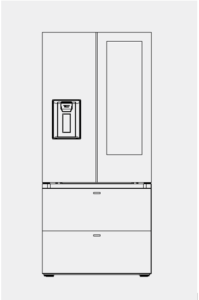
Figure 1
Auto-CAD rendering of the fridge model based on
Samsung Bespoke fridge model rendering
Basic Hardware Components
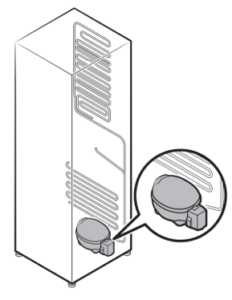
Compressor: The compressor is the heart of the refrigeration system. It is both a motor and a pump that is in charge of changing the pressure of the refrigerant to cool the fridge. It mechanically compresses the refrigerant gas and pushes it through the system, starting the entire cooling cycle. When the refrigerant leaves the evaporator, it’s converted into a low-pressure gas form. The compressor squeezes it into a high-pressure, high-temperature gas and sends it to the condenser coils. This compression is what allows the refrigerant to circulate and transfer heat effectively.
Figure 2
Image taken from Samsung hub fridge model to
show compressor placement inside the fridge
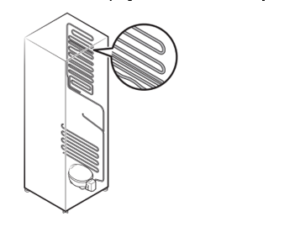
Condenser Coils: After the refrigerant picks up heat inside the fridge, it flows to the condenser coils at the back or bottom of the appliance. Here, it releases all that heat into the surrounding air. The refrigerant comes in hot and under high pressure, and as it travels through the coils, it cools down and turns back into a liquid. The coils will be made of aluminum and have ribbed fins to help get rid of the heat faster. It’s responsible for dumping the heat so the cycle can start over again.
Evaporator coils: The evaporator coils are located inside the fridge and freezer compartments hidden behind a panel. When the refrigerant reaches these coils, it turns from a liquid into a gas, and that process absorbs heat from the air around it. Aas the refrigerant leave the compressor, it will be separated into multiple sections in the fridge instead of just one line. This will allow for the user to control different temperatures in different sections of the fridge. The coils pull the heat out of the food and drinks. The evaporator fan helps by pushing the cold air around the inside of the fridge, so everything cools down evenly. The coils are made of aluminum to help transfer heat quickly and efficiently.
Figure 3
Image taken from Samsung Bespoke manual to show
condenser coils inside fridge and how it connects to compressor
Capillary Tube: This tube controls how much refrigerant flows into the evaporator coils. It is installed between the condensing unit and the evaporator, and it supplies the refrigerant from the condenser to the evaporator in a regulated amount. Its job is to drop the pressure of the refrigerant fast. When the pressure drops, the refrigerant gets very cold and ready to absorb heat once it reaches the evaporator.
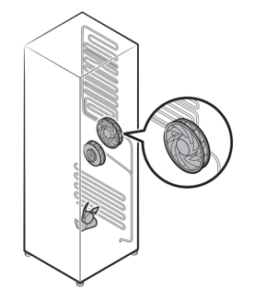
Fan Motors: The fans in the cooling unit help keep air moving inside and outside the fridge. The evaporator fan blows air over the cold evaporator coils and makes sure the cold air gets spread out evenly. This way, all the shelves in the fridge and freezer stay at the right temperature. Near the back of the fridge are condenser fans. This blows air over the condenser coils to help get rid of the heat that the refrigerant has picked up. Both fans make sure the fridge runs efficiently and doesn’t get too warm or too cold in the wrong places.
Figure 4
Image taken from Samsung Bespoke fridge manual
demonstrating fan motors and their connection with
the condenser and evaporator coils
Thermistors: These are sensors made from materials that show changes in electrical resistance when there is a change in temperature. These sensors are placed in the key cooling regions as well as the air vents and evaporator coils. When there are changes in temperature, the thermistor senses such changes and sends voltage signals to the control board. The control system uses such values to change the compressor or fan speeds to maintain the desired internal temperature of the user. The feedback loop is active in the refrigerator system to ensure food stays in stable and safe temperature ranges.
Defrost Heater: The defrost heater is placed in proximity to the evaporator coils in the freezer compartment. Moisture in the air can condense upon the coils and freeze up, creating frost build-up. The heater will turn on intermittently during a defrost cycle in order to melt away this accumulated frost. The defrost cycle is regulated either by a defrost timer or an advanced control system. The excess meltwater then drains into a collection pan. The resulting water drains into the collection pan. The process is necessary since the buildup of excessive frosting may clog the airflow and reduce efficiency in the cooling operation. The operation of the heater stops once the temperature sensor identifies that all the frosting has been cleared, thus preventing overheating and saving energy.
Drain Pan: The drainage pan is located in the bottom area of the fridge, right over the compartment containing the compressor. It is meant to collect the water produced during the defrost process, in which the defrost heating element causes the ice from the evaporator coils to melt. The water travels through a drainage tube and is collected in the pan. The compressor, in its usual operation, dissipates heat and causes the water to evaporate naturally. Since it works passively, no electrical power is necessary. The dry drain pan reduces bacterial growth and odors making it a safer location to store food.
Doors and Seals (Gaskets): The doors oof the fridge come with flexible rubber gaskets that are magnetically activated to form a firm sealing when the door is closed. These seals successfully keep the external, warmer air from entering as they keep the internal cold air inside maintaining the unit’s uniform temperature. The gaskets’ material is airtight and pliable, allowing ideal sealing even during slight door shifts. Sensors in the refrigerator detect the door’s position and alert the user the moment the door is kept open for a long time. This prevents unintentional entry of warm air and thus preventing the loss of energy. The proper sealing helps improve the fridge’s energy efficiency and reduces the workload of the compressor.
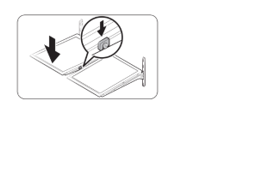
Shelving units: The shelves of the fridge are made of tempered glass and are designed to be adjustable. They fit into tracks running up and down the sidewalls of the refrigerator, where height adjustments can be made. These shelves have raised edges that are intended to be spill-proof, containing leaks and preventing contamination of the other levels. The shelves are built with a weight capacity in mind and are sloped to allow air circulation inside the compartment. Their design also influences food preservation-keeping products spaced out avoids cold spots or blocked airflow, helping cooling efficiency throughout the fridge.
Figure 5
Image taken from Samsung Bespoke fridge
manual showcasing the shelves and how they
move inside the fridge
Advanced Cooling System
Dual Cooling System: The freezer and components of the fridge have separate cooling mechanisms. This is allowed by multiple tube coming from the compressor for independent cooling coil systems. This setup ensures that each compartment maintains its optimal temperature and humidity levels. By having independent systems, it allows for different cabinets to have their own unique temperature that is most suitable for the user.
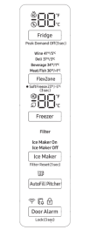
Microclimate Zone Controllers: The microclimate zone controllers allow the user to set different temperatures in specific drawers or compartments. This feature is ideal for storing various food items like meats, dairy, or produce at their preferred temperatures, helping to extend their freshness and flavor.
Figure 6
Image taken from Samsung Bespoke fridge manual
showing an example of the microclimate zone controller
inside the fridge to control different temperatures
Humidity-Controlled Crispers: These humidity-Controlled Crispers are special drawers designed to maintain the right moisture levels for fruits and vegetables. By adjusting the humidity settings, the user can create their ideal environment to keep their produce fresh for longer periods.
Auto Air Vents: Auto Air Vents are the small openings that automatically adjust to control the flow of cold air within the refrigerator. They help distribute air evenly, ensuring that all areas of the fridge maintain consistent temperatures, which is crucial for food preservation.
Multi-Flow Air System: The Multi-Flow Air System ensures that cold air is evenly distributed throughout the refrigerator. By having multiple vents at different levels, it maintains uniform temperatures across all shelves, preventing warm spots and keeping your food fresh.
Smart Technology Components
Touchscreen Panel: The Touch Screen Panel sits on the fridge door and acts as the central control hub. The user can swipe through calendars, pull up recipes, or check their family’s to‑do list without opening the fridge. It displays internal temperature settings and energy‑saving modes. Additionally, for the visually impaired, it has a tactile vibration feature or haptic feedback that allows the user to ask where an ingredient is and may either respond through the speaker or vibrate in the position where it is on screen. When the fridge detects spoilage or mold, it will alert the user on the touchscreen panel. Additionally, any recommendations based on fitness, reorganization of foods, food lists, and entertainment will be displayed on the panel.
Microphones & Speakers: With built‑in Microphones & Speakers, your fridge responds to voice commands and provides audio feedback. The microphone and speaker are installed in the touch screen panel and are connected to machine so that it can be a voice assist in whatever you need.
Barcode Scanner: As a quicker way for the fridge to recognize the food, it is occupied with a barcode scanner on the top of the fridge inside, peering out for a quick identification of the food. The scanner may scan the code on any package as you load it into the fridge, and the system automatically records the item name, quantity, and expiration date.
Sterilization Units: Installed in crisper drawers and removable trays, the Sterilization Units periodically expose surfaces to ultraviolet light. This process helps eliminate bacteria and mold spores without the use of any chemicals. This extends the life of delicate items like any leafy greens.
AI & Connectivity Feature
AI Nutrition Engine: The AI nutrition engine is an intelligent health aid embedded in the refrigerator. It combines inventory system data, nutritional goals defined by the consumer, and other integrated devices, including smartwatches or health apps. Based on analysis of food categories in stock, usage habits, and personal health goals, the engine uses machine learning to produce personalized meal proposals. It can offer meals with reduced sugars or higher protein content, as well as adjust meal planning in accordance with evolving dietary needs over time. This feature uses data processing either locally through use of the refrigerator’s processor or through an offsite cloud-based service, allowing for ongoing updates and learning that enable more healthy goal-based food planning for the consumer.
Food Spoilage Detection System: It uses an array of sensors combined with artificial intelligence-powered algorithms to assess food freshness in storage. The system uses gas sensors to detect off-gassing linked with spoilage, such as ethylene produced from rotting fruits and vegetables. Weight sensors combined with timers are also used to detect whether products have undergone measurable damage, as well as their duration in storage. The data is sent to an integrated processing unit or to a cloud platform with AI technology. After detection of a spoilage trend, alerts are sent to consumers through smart devices app
Inventory Management System: The inventory system is constantly updated with all contained items in the refrigerator. It uses internal cams, barcode, and QR code readers to scan and recognize products. Every product is time-stamped when added and then tracked based on shelf life, in accordance with defined storage conditions. The system also monitors usage behavior, such as how often particular food products are used, along with their usage habits. Based on monitoring, stock refreshment recommendations are offered by the system and alerts are sent regarding soon-to-be-spoiled items. Relevant information is displayed on the refrigerator screen as well as matched with the respective app.
Personalized Meal Planner: The personalized meal planner creates custom meal suggestions by analyzing available contents in the refrigerator, their expiration dates, and the user’s dietary goals. The feature works in collaboration with the inventory management system, spoilage detection systems, and an artificial intelligence nutrition engine to find meals that fit the user’s dietary needs, whether vegetarian, low-carb, or balanced. Recipes are fetched from either an onboard database or a cloud repository. The planner prioritizes ingredients that are near their expiration date to avert food spoilage. The planner is updated daily and learns over time by tracking which meals are accepted or skipped, thus offering a practical and health-driven solution to meal planning based on real contents inside the refrigerator.
Smart Flavor Pairing Engine: The intelligent flavor pairing engine enhances cooking practice by providing suggestions of ingredient combinations that will complement each other based upon existing food science. It leverages an extensive database of flavor profiles and known chemical compounds in order to identify harmonious tastes. If available ingredients are identified by the inventory module, the system will look for combinations that are in balance, interesting, or culturally prevalent. It can suggest combos you may not think of that are within your dietary/medical restrictions or and is useful in coming up with new meal concepts, especially where ingredient availability is limited.
Voice Assistant Integration: Voice assistants make it possible to interact with the refrigerator through natural language processing. Microphones and speakers integrated into devices capture audio commands, which are then interpreted by speech recognition software built in the appliance or through cloud-based interfaces such as Amazon Alexa or Samsung Bixby. If one asks, “What can I cook with chicken and spinach?” the assistant responds appropriately using built-in refrigerator features including inventory tracking, recipe suggestion, and spoilage alerts. It also lets you set timers, change settings, or add to shopping lists. Handsfree interaction increases convenience, especially during multitasking in cooking or with meals in progress.
Health Sync Module: The health sync module enables the integration of the refrigerator with health-centered apps, wearable fitness trackers, or medical records. It aggregates dietary goals, recognizes nutrient deficiencies, and integrates dietary restrictions prescribed by doctors in order to inform food suggestions. For example, if a user is recommended to increase their iron intake, the system will highlight iron-rich ingredients and recipes. In addition, it adapts to fitness goals like muscle gain, weight loss, or maintenance by modifying meal planning accordingly. Information is securely communicated through APIs (Application Programming Interfaces) and processed in parallel with the AI Nutrition Engine. This feature turns the refrigerator from a storage device into a health-promoting appliance personalized to the user’s well-being.
Wi-Fi and Bluetooth Modules: Wi-Fi and Bluetooth modules are found on the control board of the refrigerator, which facilitates the fundamental smart connectivity. The Wi-Fi module provides a connection between the refrigerator and the home network and thus enables access to cloud-based services, software updates, data synchronization, and remote control via mobile apps. However, the Bluetooth module provides short-range connectivity with smart home appliances, smartphones, and tablets. The modules further enable integration with voice-assisted assistants, networked appliances, and external applications like grocery delivery and ovens. Their unified communications platform spans all platforms, allowing features including inventory synchronization, real-time alerts, and firmware updates. The ability of the smart features would be much diminished without the modules.
Mobile App Interface: The mobile app interface extends the capabilities of the refrigerator beyond the kitchen boundaries, allowing users to exercise control from any remote location. The app, through the fridge, provides users with real-time inventory, expiration dates, spoilage notifications, and temperature control. Some apps also display live camera views of the interior of the fridge, avoiding the duplication of purchases. The app communicates with the fridge using Wi-Fi or Bluetooth and integrates with the meal planner, nutrition engine, and inventory tracker. When grocery shopping, the app proves particularly helpful as users can see what they need in the moment.
Freshness System
LiDAR Sensor Module: LiDAR works by sending rapid light pulses that in our fridge, will bounce off food items and return to the sensor. These sensor modules will be on the upper interior corners of the fridge’s ceiling and bottom shelf to provide a 3d map of the food through laser scanning. This allows for a precise 3D modeling of each object’s shape and location. This technology lets the fridge track food placement, monitor shrinkage or deformation (a sign of spoilage), and distinguish between individual items even when grouped together or thrown around in the fridge. The LiDAR system works with the RGB camera and shelf trackers to maintain a live inventory map. Its data is processed by the edge AI module for object recognition and spoilage detection.
This technology is an advancement from Samsung’s because of Samsung’s 2d image recognition limitations. Samsung’s system uses a single RGB camera that captures 2D images and can thus see what’s on the shelves but cannot determine depth, size, or item stacking effectively. Our LiDAR sensor system on the other hand, can tell people which items are in front, behind, overlapping, or stacked, something that a 2D camera cannot accurately process. Additionally, because of the image recognition Samsung employs, users have to wait until the fridge detects the food one by one before putting it inside and must be visible by the front camera by at least 65%. Our LiDAR system can visualize the entire fridge without it being visible in a row for the camera to see. Additionally, although Samsung’s technology combines foods that are added all at once to be one object, LiDAR does not have this limitation because of its scan once the door closes.
High-Resolution RGB Camera: These cameras will be positioned under and synced to each LiDAR module to allow the system to recognize the food’s identity, color, and any brand labels. Because of the system’s sensitivity to change in volume, it can even track bruising or mold visually over time. The high-resolution RGB camera provides full color visual imaging of whatever is in the fridge. It will capture detailed photographs of stored food items after each door closure, which are then analyzed using image recognition algorithms to identify the food type, monitor surface changes, and flag visual spoilage like mold or browning. If the food cannot be identified or is in a container the screen will display the unknown object, and the user will have the option to specify what it is. It works with the LiDAR sensor to pair visual data with spatial positioning, enhancing item tracking accuracy. This camera supports the flavor-pairing and inventory functions and sends data to the microcontroller, which updates the screen and app interface with real-time inventory visuals. While Samsung’s fridge gives a warning about photographing people’s bodies when trying to capture identifiable data, our camera system does not need to worry people about any non-consensual photos of themselves.
Ethylene Gas Sensor: While ripening, many plants produce a natural hormone called ethylene. To prevent accumulation of expired food in the fridge, we will place ethylene gas sensors in the fresh produce drawer zone, where fruits and vegetables are most commonly stored. These sensors will detect the change in ethylene concentration indicating when a fruit is going bad or has already done so. Any elevated ethylene levels will trigger alerts on the screen when foods like apples or bananas are about to spoil. This also helps predict spoilage speed of ethylene-sensitive vegetables. The sensor will communicate with the microcontroller to recommend food reorganization or a recommended prioritization. It also supports the fridge’s microclimate zoning system, helping adjust airflow and humidity around ethylene-sensitive foods to extend freshness.
Temperature & Humidity Sensors: Temperature and humidity sensors will be placed across various compartments in the fridge. Their purpose is to not only monitor real time temperatures and humidity, but to also think how it will affect any foods that are in the fridge. Each sensor would report the localized temperature and humidity data to the central microcontroller. With this data, a map of individual temperatures across the fridge can be shown on the screen if the user wants to visualize where in their fridge is coldest and warmest. These temperature and humidity data help the fridge recommend optimal storage locations for different types of foods, activate microclimate controls, and track conditions that may accelerate spoilage. For example, if raw poultry is in a less cold part of the fridge where it could potentially lead to an accumulation of bacteria, the fridge can alert the user of a better place to put the meat based on temperature. These sensors allow for maintaining safe food temperatures and preserving the nutritional quality of the produce.
Shelf Position Trackers/Depth Cameras: Shelf position trackers, integrated along the fridge’s sidewalls, and depth cameras mounted near the LiDAR units together form the spatial orientation system. These shelf sensors detect which shelf level each item rests on, while the depth cameras provide horizontal and vertical object placement data. When the LiDAR system recognizes the food or the user manually identifies it, the data is then sent to the position tracker to constantly know where the food is inside the fridge. This enables accurate mapping of food items by location. When a user asks the fridge where an item is, the system references this location data and responds via voice, on-screen display, or a tactile vibration placement on the screen for the visually impaired. The shelf trackers also help identify overcrowding and may recommend a better placement where items should be stored for better cooling or reduced spoilage risk.
Microcontroller/Edge AI Module: Located behind the control panel near the fridge’s front screen, the microcontroller and edge AI module serve as the refrigerator’s central processing hub. This unit processes data from all sensors, including vision systems, gas detectors, and environmental monitors, in real time without relying on external cloud services. It runs on machine learning models to identify food, track spoilage, predict restocking needs, and generate personalized nutrition and meal suggestions. It interfaces with the user via the front screen and mobile app, displaying alerts, recipes, and inventory status. The module also manages voice commands, enabling smart features like food location assistance and dietary tracking.
Structural and Mechanical Additions
Sliding or Modular Drawers: Modern refrigerators often feature sliding or modular drawers, designed for easy access and organization. These drawers can be adjusted or moved to accommodate different sizes of food items, making it convenient to store and retrieve items without rearranging the entire fridge. Some models, like the U-Line 24″ Refrigerator Drawers, offer full-extension stainless steel drawers with digital touchpad controls and convection cooling systems for consistent temperatures.
Automatic Ice & Water Dispenser: An automatic ice and water dispenser provides quick access to chilled water and ice without opening the refrigerator door. This feature enhances convenience and encourages hydration, especially beneficial for families and frequent entertainers. Some dispensers are equipped with UV light technology, like LG’s UVnan, which helps reduce bacteria on the dispenser nozzle, ensuring cleaner water and ice.
Flexible Compartments: Some refrigerators come equipped with flexible compartments, like Samsung’s FlexZone, allowing you to adjust the temperature settings to suit different types of food. Whether you need to store beverages, meat, or vegetables, these compartments can be customized to provide optimal storage conditions. The compartment can be set to various modes, such as Freeze, Soft Freeze, Meat/Fish, Fruit/Veggies, or Beverage, offering versatility for your storage needs.
Anti- Bacterial Coatings: Anti-bacterial coatings are applied to the interior surfaces of some refrigerators to inhibit the growth of bacteria and fungi. This feature helps maintain a hygienic environment, reducing odors and keeping food fresher for longer periods. Materials like silver or copper are often used for their antimicrobial properties, disrupting the cell membranes of microorganisms and preventing their growth.
Lighting Systems (LED + Targeted Lights): Modern refrigerators utilize LED lighting systems, which provide bright and energy-efficient illumination. Some models feature targeted lighting to enhance visibility in specific areas, making it easier to locate items and improving the overall user experience. LED lights are durable, consume less energy, and emit less heat than traditional lighting, contributing to the refrigerator’s overall efficiency.
Cost & Time
The estimated cost is composed of the individual cost of both the materials and technology to the marketing. The estimate is the following:
| Hardware Components | $340-695 |
| Advanced Cooling System | $280-510 |
| Smart Technology & Sensors | $540-980 |
| AI & Software Features | $300-700 |
| Manufacturing, Marketing, Profit Margin | $1000-2000 |
| Estimated Consumer Cost | $2500-4500 |
The estimated time to make the smart fridge would be 2-3 years since we’d be starting from scratch. Prototyping is estimated to take around 8-12 months, engineering could take 6-8 months, testing and manufacturing would be estimated to take 4-6 months each, and the pilot run could take 2-34 months. So in summary, the estimated cost and time of the fridge respectively would be $2500-4500 and 24-36 months.
Materials
Stainless steel or powder-coated sheet metal: exterior panels
ABS plastic or food-safe polycarbonate: interior shelving, drawers, bins
Vacuum-insulated panels (VIPs) or polyurethane foam: thermal insulation
Glass or acrylic panels: touch door or see-through sections
Silicon and rubber gaskets: airtight seals around doors and drawers
Tempered glass: shelving
Compressor: rotary or inverter type
Evaporator coil and condenser coil: aluminum or copper
Refrigerant: R600a (isobutane) or R134a
Fans and ducts: airflow and microclimate distribution
Humidity control membranes or materials: for crisper drawers
Thermistors or RTD temperature sensors: internal temperature reading
Peltier elements: for microclimate zones (optional)
Main control board (MCU or SoC): logic and AI processing
Touchscreen display: LCD or OLED with capacitive touch
LiDAR sensor or depth camera: for detecting food item location
Optical cameras: RGB and possibly infrared
Gas sensors: ethylene, ammonia, VOC sensors
Barcode scanner or RFID reader: for inventory tracking
Weight sensors or load cells: to detect item presence
Microphones and speaker: for voice control
Wi-Fi and Bluetooth module: for connectivity
NFC module: for mobile tap functions
UV-C LED lights: surface sterilization
Interior LED lighting: cool white or daylight spectrum
Activated carbon and sediment filters: water purification
Water reservoir and tubing: food-safe plastic
Solenoid valves: for water flow control
Pump system: to move water
Ice maker unit: tray, motor, optional ice crusher
Drip tray with drainage: under water dispenser
Sliding drawer rails and gears: smooth operation
Hinges and tension dampers: soft-close doors
Electromagnetic locks or smart seals: optional safety features
Transparent or color-coded drawer panels: smart drawer visibility
Anti-bacterial or nano-silver coatings: food safety
Power supply unit (PSU): AC to DC conversion
Battery backup: optional for smart features during outage
Surge protection circuits and fuses
Transformers: for powering LEDs and sensors
PCB boards and wiring harnesses: electrical connections
References
Refrigerator User manual Free Standing Appliance. (n.d.). Retrieved April 22, 2025, from https://downloadcenter.samsung.com/content/UM/202503/20250318090146056/FDR_RF8000F_F-Hub_DA68-04835A_EN_MES_CFR.pdf
Refrigerators, Smart Fridges & Freezers. (n.d.). Samsung Us. https://www.samsung.com/us/refrigerators/
Tuohy, J. P. (2025, January 2). Samsung’s smart fridges will use AI to suggest groceries to buy on Instacart. The Verge. https://www.theverge.com/2025/1/2/24334411/samsung-instacart-smart-fridge-partnership?

